What is Working from Home Ergonomics?
Are you working from home? Have you placed much thought into your workspace and how it can affect your body and long term health? This blog seeks to educate you on why serious consideration of the ergonomics of your workspace and habits while working from home can prevent serious health issues for you.
Ergonomics is an analysis of the process of interaction between a person and his or her environment. It takes into consideration a person’s body composition, flexibility, strength, joint mobility, cardiovascular health, and movement habits and postures in a particular setting. It also considers the variables of the setting which, in this case, would be the home office setting. Good ergonomic principles consider the safe and efficient use of yourself, your workspace and the activities you need to do in your workspace.
Evolution of Work
The advancement of technology in our modern life was supposed to make work easier and faster. However, the dawn of the personal computer brought along with it several unwanted issues. As a nation, we have become more sedentary and more susceptible to repetitive stress injury. The new sedentary form of work life has led to increasing risks of obesity, diabetes, high blood pressure, heart disease and musculoskeletal disorders.
Because humans were not designed to sit still for long periods of time and to repeat the same movements over and over again, it is no surprise that certain issues develop with the remote worker. Do you experience eye strain? fatigue? back or neck pain? sore muscles? hand/wrist issues? You are not alone and we hope to help you with some easily applicable information.
In an agrarian economy, people perform physical work throughout the day using many different muscle groups and movement patterns.. In an industrial age, people work on their feet and constantly use their upper body and extremities. We are now in an information economy where people sit and use their forearms while orienting their upper body toward a stationary screen at least 6-8 hours a day. This set up of limited repetitive activity can wreck havoc on our bodies.
Three main dangers from home desk work
The three main culprits lurking in the modern workspace for working from home are prolonged sitting, poor seated postural habits and repetitive hand/upper extremity movements. Learning how to create a good ergonomic home office set up, how to develop better movement habits/breaks in your day and adjusting how you are using your posture and upper body will go a long way in protecting your overall health.
Did you know that men who sit more than six hours a day are up to 65% more susceptible to heart disease? Excess weight and lack of physical activity even in people who do not smoke are considered important risk factors for developing cancer. Did you know that there are a class of musculoskeletal disorders associated with keyboards, mice and screens?
Fortunately, there are several easy changes you can make if you are working from home that will greatly help in reducing the above risks. Be open to seeing your space and your work from a new perspective. You are about to learn several habits that will improve work and your life!
The issue with prolonged sitting
Since many of us are no longer farmers or construction/factory workers, we are now shackled to our workplace. Instead of movement, we experience a relative inertia as we sit in stillness of our office chairs and use equipment that is stationary requiring the same body motions over and over again. Humans were not meant to sit still. We were made to move with over 300 joints and over 600 muscles. You need to add variety of posture and movement into your work from home day.
What happens to our bodies when we sit all day? Sitting can increase intradiscal pressure . Discs are those supportive cushions between our vertebrae. Day after day, prolonged sitting pressure can alter the health of these protective cushions making us more prone to bulging discs, herniated discs which can press on nerves and create pain in our backs and down our legs.
Prolonged seated posture resets the length of certain muscle groups impacting our general body flexibility. The muscles in the front of our hips (hip flexors) become tight. Tight hip flexors can pull on our low back region contributing to episodes of low back pain. It can also create pelvic malalignments and limit the length of our stride when we walk. Conditions normally seen in older patient populations due to inactivity and sitting too much are starting to appear in younger remote workers as well.
The hamstring muscles (behind your thigh) can also be affected due to prolonged sitting and can contribute to pressure on your sciatic nerve causing pain and stiffness. Your gluteal muscles (buttocks and hip stabilizers) are put in a position of prolonged stretch and this can lead to stretch induced weakness in these very large functional muscle groups which stabilize your hips and lower spine and are used for a multitude of movements throughout our day.
Poor prolonged seated posture affects our entire framework. The old adage of “the hip bone’s connected to the back bone” and so on is really true. Posture in one body part affects all other body parts. The position of your low back impacts the position of your neck and the position of your neck impacts the position of your low back.
When certain muscle groups are kept shortened and others are placed in perpetual stretched positions from prolonged sitting, muscle imbalances occur that contribute to the cascade of seated workplace perils. For example, sitting with a forward head posture stretches the scalene muscle groups in the front of your neck. The scapular nerve runs through this area and powers a muscle in your upper back called the rhomboids that normally work to help keep your shoulders from rounding forward. Prolonged compression on this nerve will weaken the signal to the postural support muscle creating a weakness scenario that further cascades into other changes in nerve length/position and power to many other supportive postural muscles.
How bad posture leads to pain, weakness and fatigue
In order to let you further understand the biomechanical influence poor posture or prolonged seated posture has on your body, try these activities so you can feel what we are talking about in this blog.
Bend your index finger backward with your other hand until it hurts. Hold it there for a little bit. The longer you hold it there, the more the soft tissues (ligaments, tendons) are stretched and pain grows because the pain nerves in the area are activated. An X-ray of the finger would be unchanged and appear normal; however, pushing the extremes of positioning fires off protective pain signals to tell the brain that the joints are being pushed to their limits. When this happens in our neck and spine, potentially 48 places at once are being pushed to limits and will talk back to us via our pain alert system.
Poor posture also limits full movement capacity. In sitting, slouch your low back and protrude your neck forward. Next try to turn your head from side to side taking inventory of how far you can move. Then, try to raise your arm up over your head again taking inventory of how far you can reach. Now, sit up straight and place your neck in alignment with the rest of your spine. Repeat the movement efforts. You will note how much more motion you have when moving on a properly positioned neck/spine versus a poor posture position.
When we sit in prolonged poor postural positions, we also experience reduced capacity to take deep breaths. Again, slouch and try to inhale feeling how much air you think you are driving into your body. Now sit up in good alignment and repeat noting how much further your diaphragm muscle can move and expand your lungs. A decrease in oxygen intake will contribute to how fatigued you feel during your workday.
When we repeatedly position ourselves poorly, we impact our skeletal framework, soft tissues and nerves that connect to our framework. Our pain alert system is a means for our body to tell us its time to adjust or change our posture and to reset in order to prevent injury. We need to be able to breathe deeply during our work and oxygenate our bodies in order to nourish our tissues and help with our stress and mental health too.
If you are experiencing headaches, painful or restricted neck movement, pain/numbness in scalp, this may have its origin in your posture. Similarly, pain in low back or down your leg may be related to poor seated postural habits.
Repetitive hand/upper extremity movements in deskwork
Most upper extremity injury associated with seated work are the result of cumulative trauma. Unlike a car crash with immediate injury, repetitive strain injury does not occur instantaneously. It creeps up insidiously over time. Repetitive strain injury is a cumulative trauma disorder that comes from prolonged ,repetitive and forceful or awkward hand movements.
Computers have definitely improved our lives with efficiency and ease of fixing typing errors. However, it is helpful to pause and think about the old manual typewriter in the workplace and how, even though it was inefficient, it did offer some protective aspects for worker’s hands and upper body.
For example, a manual typewriter forced the typist to frequently pause to move the carriage or change the paper. It also forced the typist to keep the wrists in a neutral position and the keys on a manual typewriter absorbed the pounding force of a typist’s fingers on the keys because they had a certain amount of spring. Modern keyboards allow for more keyboard strokes each minute without periodic interruption and forces the wrist into excessive flexion or extension. The base of the modern keyboard does not have the same counter spring mechanism of the old typewriter.
This increase in ability to frequently hit the keyboard without absorbing the force in addition to non neutral wrist positions can put unnatural positioning strains on hands and wrists. Repetitive strain starts unnoticed. As hands and wrists are continually overworked, tingling, numbness and weakness begin to develop in fingers and wrists. Items such as wrist support pads in front of keyboards can help keep wrists/hands supported and avoid awkward repetitive movements.
10 Ergonomic Suggestions for your Workspace
Every worker is built differently. There is no one perfect workstation, rather, the worker must apply knowledge of their body and work tasking to create a good workstation for themselves by modifying existing things or adding new elements. Here are the building blocks of a good computer workstation.
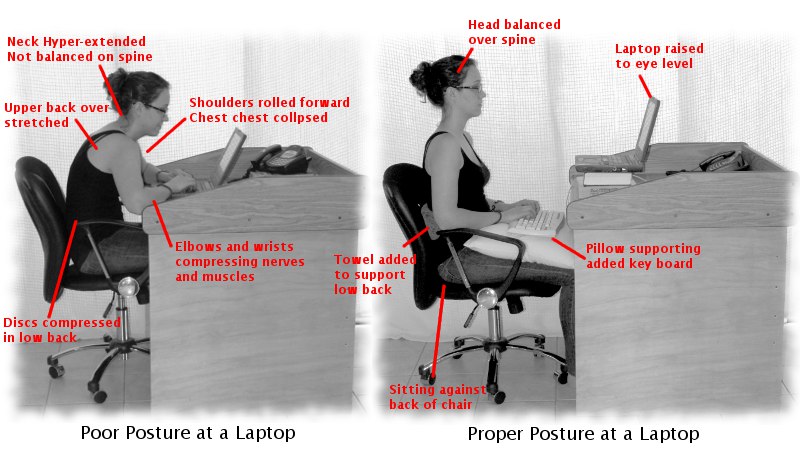
- Your work desk chair: Adjust the height of your chair so your upper thighs are parallel to the floor. Your knees should be level with or slightly higher than your hips. Your feet should touch the floor or you may need a footrest to keep your ankles neutral. The height of the front of your chair should be approximately the length of your lower leg. The depth of your seat cushion should provide at least one to three inches of space from directly behind your knee to the front edge of the seat in order to promote good leg circulation. The back of the chair should support your spine and allow the addition of a lumbar support if desired. Make sure that the armrests are not too long. Your chair must be able to get close to your workstation and not force you to lean forward to reach your keyboard.
- Keyboard position/adjustable keyboard tray: The height of the keyboard should match the height needed to make your hands, wrists and forearms are positioned in the same plane or level. Use an adjustable keyboard as needed and provide yourself a wrist support at end of keyboard. Gel wrist supports are good for reducing direct pressure on wrists.
- Computer mouse design: The mouse should fit the palm of your hand and be meant for your dominant hand.
- Supplemental Task Lighting: Do not work with the light of your computer alone. Add some task lighting which will reduce your tendency to lean in to see the screen. This will avoid poor posture and eye strain overtime. Light your workspace.
- Position your monitor in the right place: The top of your monitor should be even with your forehead and directly in front of you. You should not be looking up or down at the monitor with your neck. Rule of thumb is an arm’s length away from your face. Eyes can be 15-30 degrees of downward gaze.
- Use a head set or phone on speaker mode. No abnormal neck positioning for phone use.
- Use a document holder: Place on same plane as your monitor. This will avoid neck and eye strain.
- Take a 3 minute break every 30 minutes: Stand up, take a few deep breaths, stretch your neck and shoulders, rest your eyes and drink some water. Use the timer on your phone to remind you.
- Optimize your reaching zones: Primary zone is your keyboard and mouse. Use a keyboard tray as needed. Next zone is for frequently used items such as your phone or calculator, stapler. Third zone is for items rarely used.
- Laptop considerations: Laptop keyboards are designed for portability and transport without ergonomic adjustability. By its design, if the keyboard is in the right position, the screen is too close and if the screen is in the right position, the keyboard is too high. Use a laptop with the largest screen possible that still makes it easy to transport. Use a laptop holder or stand. This is the most important thing your can do to optimize your laptop ergonomics. Adjust screen to be at arm’s length in front of you and at eye level. Use a separate or external compact keyboard at the right height for your forearms and shoulders to be neutral and relaxed. Ideally, on an adjustable keyboard under your desk surface. Use a separate external computer mouse. When traveling and carrying your laptop, carry your bag across your lower back in a messenger bag style or use a backpack. Be sure to use both straps around your shoulders.
You can also consider standing desks or desks that can switch from seated to standing positions to help adjust your posture throughout the day. There are even exercise devices such as desk treadmills that can be used to move while you are at work. Lumbar rolls to place behind your low back can make your chair more comfortable. Learning the right kind of stretches to do at your desk will also greatly help you. We have a blog for that too.
If you do begin to experience pain, numbness or tingling, do not put it off or think you will work through it. Seek professional help and advice. The earlier a physical therapist can evaluate your problem and give you treatment and education, the less severe or permanent your discomfort can be.
Great Videos
https://youtu.be/K88q_oEwRS8?si=7KnPzWau4Y0AbS1c
Check out these similar topics
For moms with young children: Ergomomics ergonomics for moms:
https://www.optimal-pt.com/ergonomics/
Avoiding Tech injury
https://www.optimal-pt.com/repetitive-stress-injury-combines-tech-and-poor-posture-habits/
Desk job Exercises
https://www.optimal-pt.com/desk-job-exercises/